



- Help center
- Locations & settings
- Connect Stripe to take card payments
Connect Stripe to take card payments
Card payments run through Stripe. Connect your account in a couple of clicks.
Where to find itSettings › Locations › ⋯ Edit › Payments
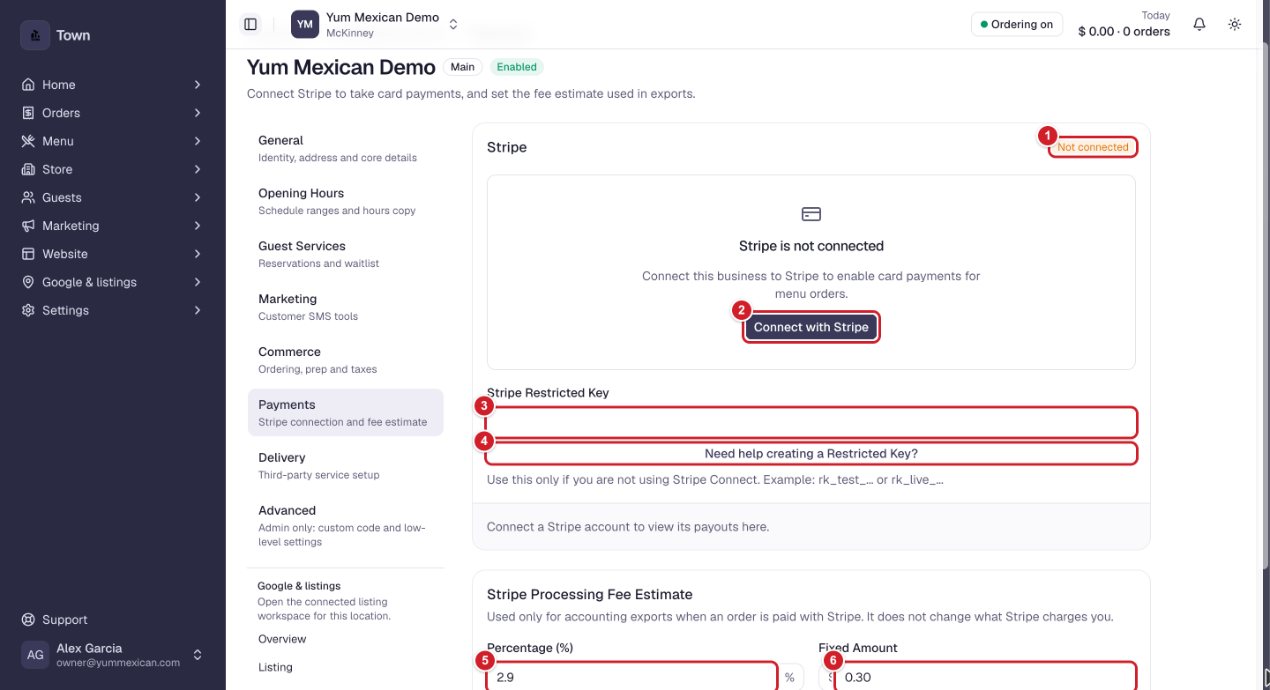
- 1Status "Not connected" until you finish setup.
- 2Connect with Stripe Starts setup on Stripe’s site.
- 3Stripe Restricted Key Only if you are not using Stripe Connect. Most restaurants leave it blank.
- 4Need help creating a Restricted Key? Instructions, if you need a key.
- 5Percentage Your Stripe fee estimate.
- 6Fixed Amount The per-order part of the fee estimate.
- Open the location’s settings and click Payments.
- Click Connect with Stripe 2.
- Finish the steps on Stripe’s site. You come back to Town when you are done, and the status 1 updates.
The Stripe Processing Fee Estimate 5 6 is only used in accounting exports. It does not change what Stripe charges you.
Tip
Our Stripe video guides walk through setup step by step.
Still stuck?
Ask Alfredo inside your Town admin, call (469) 249-2795 or email support@town.club. Real people answer 24/7.