



- Help center
- Google & listings
- Keep your menu up to date on Google
Keep your menu up to date on Google
Send your Town menu to your listings, by hand or automatically.
Where to find itGoogle & listings › Menu
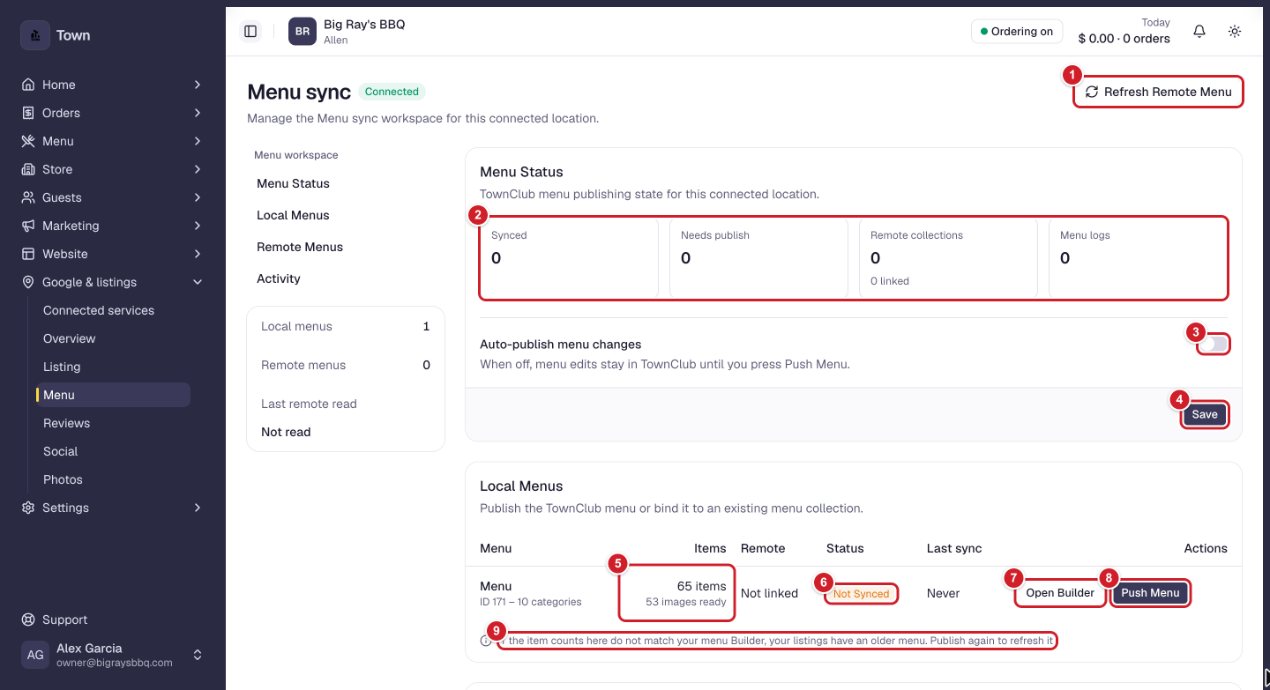
- 1Refresh Remote Menu Checks what your listings have now.
- 2Menu Status Synced, Needs publish, Remote collections and Menu logs.
- 3Auto-publish menu changes On: menu edits go out automatically. Off: they wait until you press Push Menu.
- 4Save Saves the auto-publish setting.
- 5Items Items and photos in your Town menu.
- 6Status Like Not Synced or Synced.
- 7Open Builder Opens the menu in the Builder.
- 8Push Menu Sends this menu to your listings now.
- 9Counts do not match? Your listings have an older menu. Push it again.
Still stuck?
Ask Alfredo inside your Town admin, call (469) 249-2795 or email support@town.club. Real people answer 24/7.