



- Help center
- Email marketing
- Send a one-time campaign
Send a one-time campaign
Pick an email and who gets it, review the draft, then schedule it.
Where to find itMarketing › Email Marketing › Campaigns
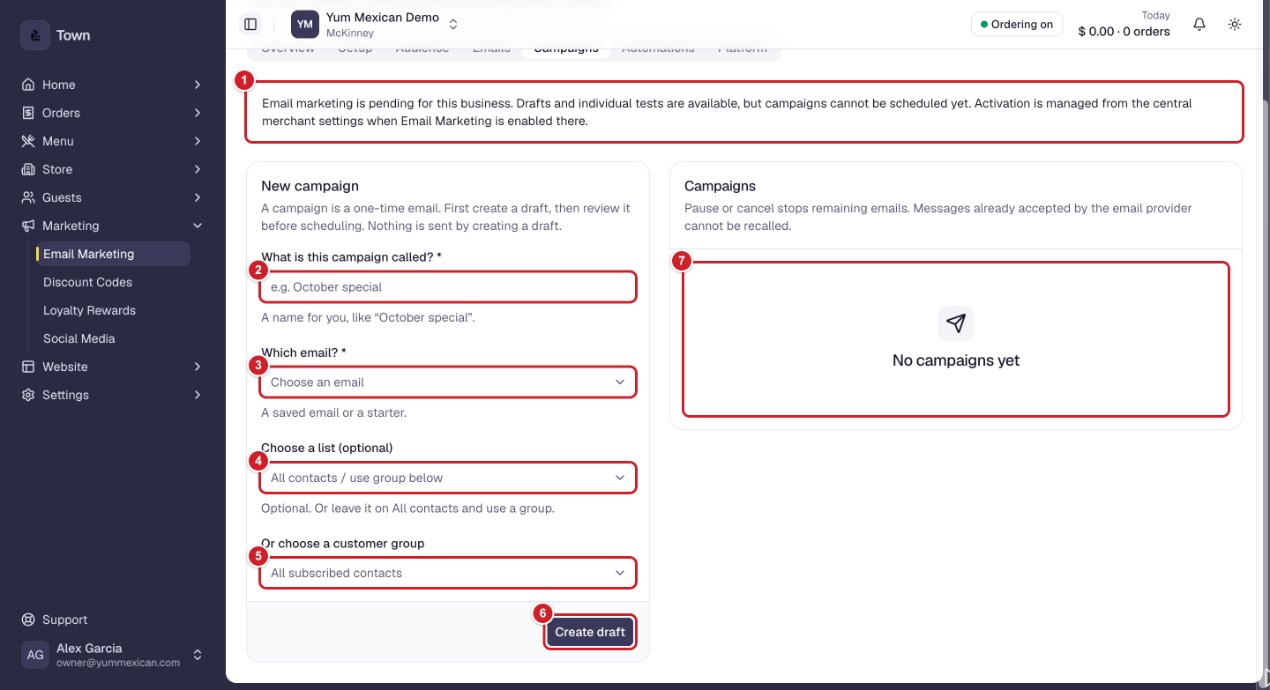
- 1Activation notice While Email Marketing is pending, you can make drafts and tests but cannot schedule campaigns.
- 2Campaign name For you, like "October special".
- 3Which email A saved email or a starter.
- 4Choose a list Optional.
- 5Or choose a customer group Or leave the list on All contacts and pick a group.
- 6Create draft Makes a draft. Nothing is sent yet.
- 7Campaigns Your campaigns and their status.
- Make and save your email on the Emails tab.
- On Campaigns, name the campaign and pick the email.
- Pick a list or a customer group.
- Click Create draft, review it, then schedule it.
Good to know
Pausing or canceling a campaign stops the remaining emails. Emails already accepted by the email provider cannot be recalled.
Still stuck?
Ask Alfredo inside your Town admin, call (469) 249-2795 or email support@town.club. Real people answer 24/7.