



- Help center
- Email marketing
- Set up automatic emails
Set up automatic emails
Welcome emails, cart reminders, birthdays, win-backs and more, sent automatically.
Where to find itMarketing › Email Marketing › Automations
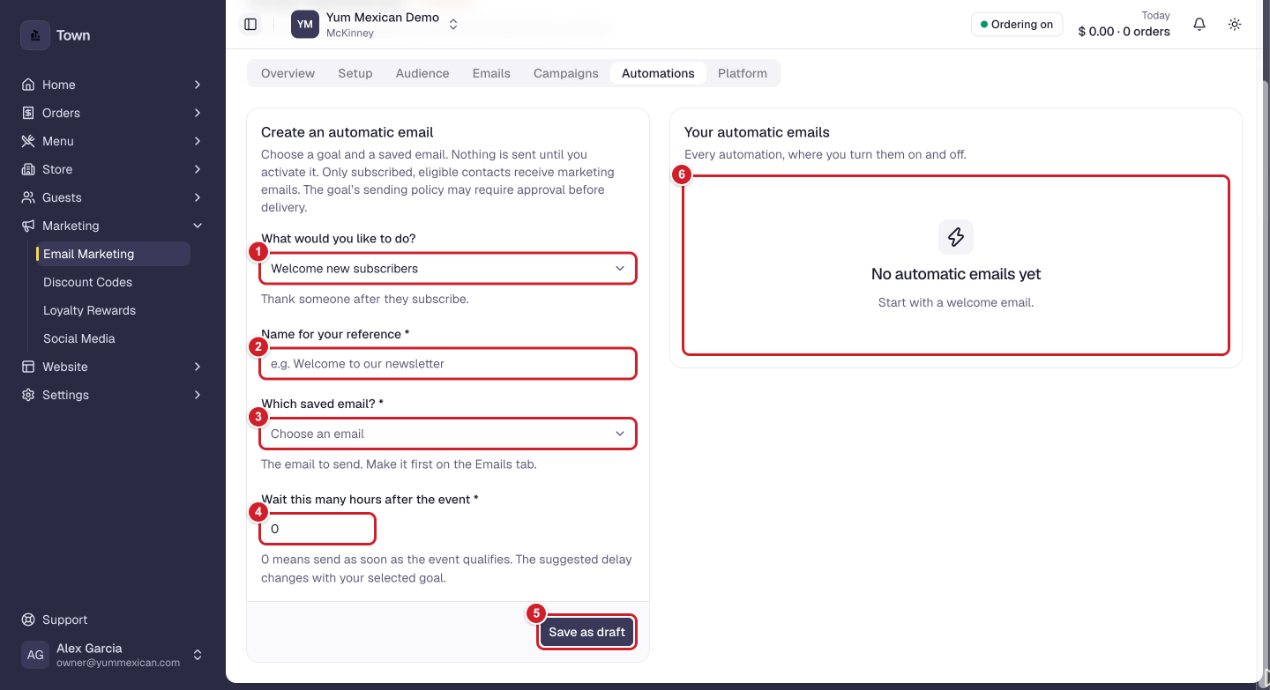
- 1What would you like to do? The goal, like Welcome new subscribers.
- 2Name for your reference Like "Welcome to our newsletter".
- 3Which saved email Make it first on the Emails tab.
- 4Wait this many hours 0 sends as soon as the event happens.
- 5Save as draft Nothing is sent until you turn it on.
- 6Your automatic emails Every automation, where you turn them on and off.
Goals you can choose
- Welcome new subscribers
- Remind about an unfinished order
- Thank customers for their first order
- Invite customers back
- Suggest their next meal
- Reorder reminder
- Reconnect with inactive customers
- Invite customers to loyalty
- Celebrate a new reward
- Remind about an expiring reward
- Celebrate VIP customers
- Birthday wishes
- Customer anniversary
- Business anniversary
- Follow up after catering
- Reconnect with loyalty members
- Follow up after a reservation
Only subscribed, eligible contacts receive marketing emails.
Still stuck?
Ask Alfredo inside your Town admin, call (469) 249-2795 or email support@town.club. Real people answer 24/7.