



- Help center
- Email marketing
- See your email results
See your email results
Opens, clicks and the orders your emails brought in.
Where to find itMarketing › Email Marketing › Overview
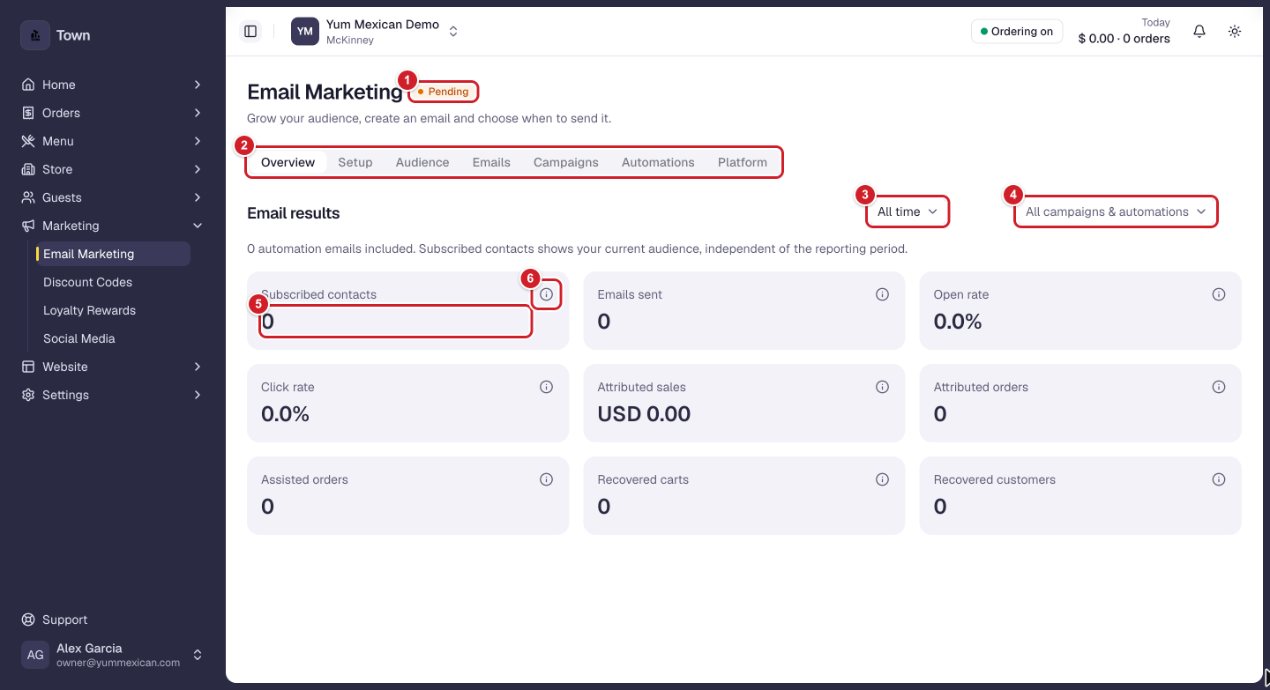
- 1Status Pending until the Town team activates email marketing.
- 2Tabs Overview, Setup, Audience, Emails, Campaigns and Automations.
- 3Reporting period All time, or the last 7, 30 or 90 days.
- 4Campaign or automation All of them, or just one.
- 5Subscribed contacts Contacts who can get marketing emails right now.
- 6Info Hover any number for what it means.
- Emails sent
- Campaign and automation emails accepted for sending in the period.
- Open rate
- Unique people who opened, divided by delivered emails. Privacy features can affect opens.
- Click rate
- Unique people who clicked, divided by delivered emails.
- Attributed sales
- Value of orders linked to an email, including estimates. Not your total sales.
- Attributed orders
- Orders linked to an email click or a recently sent email.
- Assisted orders
- Orders from people emailed recently without a tracked click. An estimate.
- Recovered carts
- Orders linked to cart reminder emails.
- Recovered customers
- Orders linked to win-back or loyalty emails.
Tip
Open and click rates need Track opens and clicks turned on in Setup.
Still stuck?
Ask Alfredo inside your Town admin, call (469) 249-2795 or email support@town.club. Real people answer 24/7.